
The apps
Field software, built in the field.
ShefaLinx is one app with four tools — a job tracker, pre-energization checklists, job hazard analyses, and field leadership org charts. Every one opens as a free demo on a sample job, with no account.
ShefaLinx
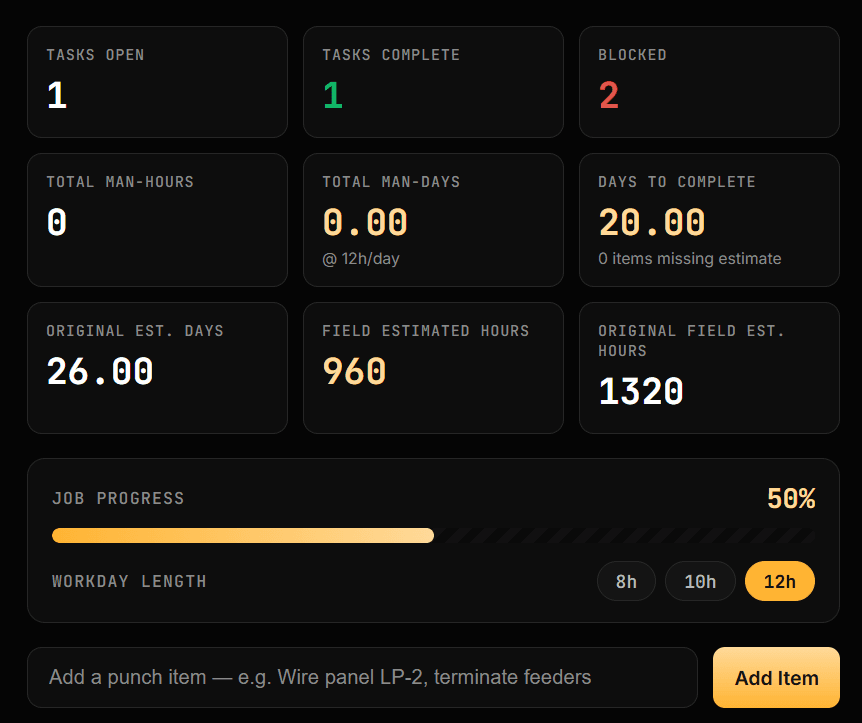
The job tracker a superintendent runs — and management can read.
Punch lists, manpower, and roadblocks in one place, built by a superintendent. The people running the work get a fast way to track it; the managers above them get real numbers on power-on, air-on, and temp removal — the confidence everyone needs at the OAC meeting.
- Milestone tracking for power-on, air-on, temp removal, and any other date the schedule hinges on
- Live job dashboard: tasks open, blocked, man-hours, and percent complete
- Roadblock flags — design/RFI, predecessor, sequencing, change order, trade stacking
- Completion lists with photo uploads, tied to the task
- Workday length switching between 8, 10, and 12 hour days
Manloader
Turns the schedule into a weekly crew loading chart with real labor cost, and flags the week a crew falls short before that shortfall costs a milestone.
Field Calculators
Duration, install quantity, conduit per 100 ft, wire per 1000 ft, crew hours, and install goals — run on the phone, in the field.
Completion Lists
Punch items assigned by trade with due dates, photo evidence, and a closeout report generated from what the crew actually logged.
QA/QC & Commissioning
The checklist behind QA/QC Pre-Energizations.
QA/QC & Pre-Energization Checklist means a real checklist tracked per piece of gear — not a verbal "looks good" from the crew. This is that checklist, built as a tool: every piece of equipment logged and verified before it gets energized.
Pre-Energization Checklist
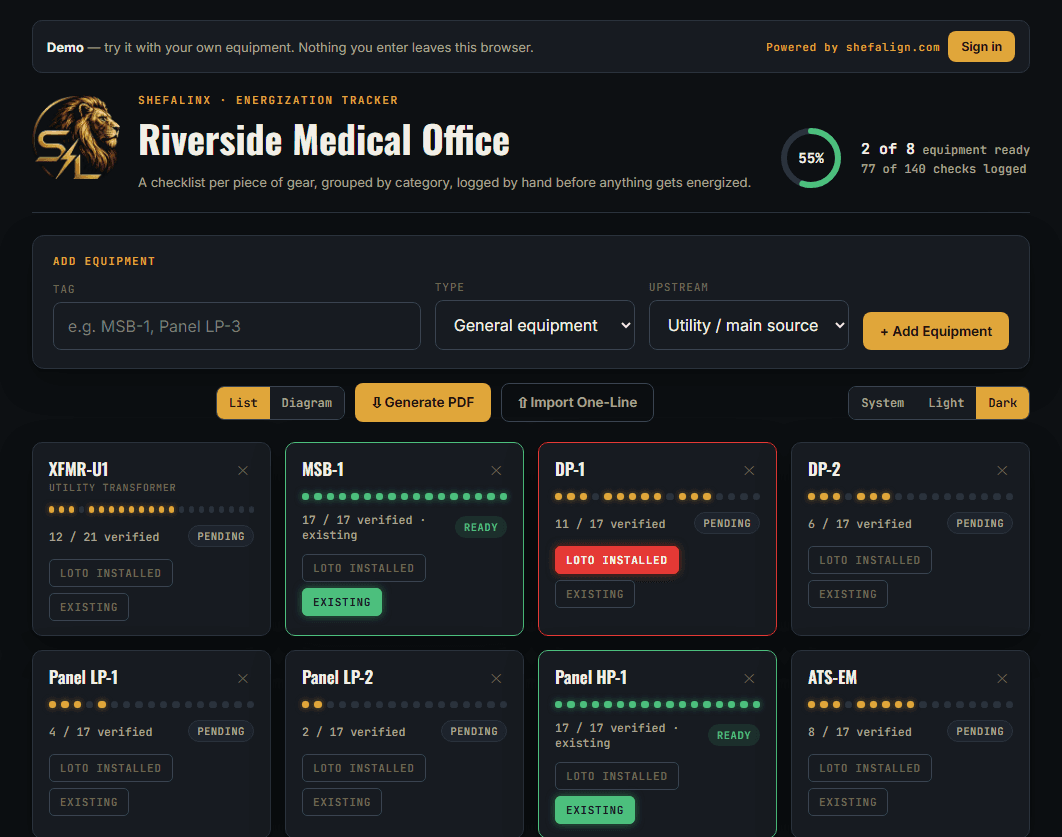
A per-equipment checklist, logged before anything gets energized.
Torque, testing, grounding, and labeling conditions tracked per piece of equipment — not just per job — with a one-line diagram showing what feeds what. Part of the ShefaLinx family, built for the same crews on the same job sites.
- Per-equipment checklist grouped by category — Physical & Visual, Torque & Termination, Testing, Grounding & Bonding, Protective Devices, Labeling
- Separate checklists per equipment type — a transformer's pre-energization checks aren't a switchboard's
- One-line diagram, drag to arrange, showing what feeds what
- Notes logged per condition — who verified it, when, and the values
- LOTO and Existing on every piece of gear — Existing marks gear already in service as done in one press — plus N/A for checks that don't apply
Safety paperwork
A JHA the crew can sign on their own phones.
Fill one out before the work starts, have everyone sign it, and file it by month — instead of a stack of paper in the truck.
Job Hazard Analysis (JHA)
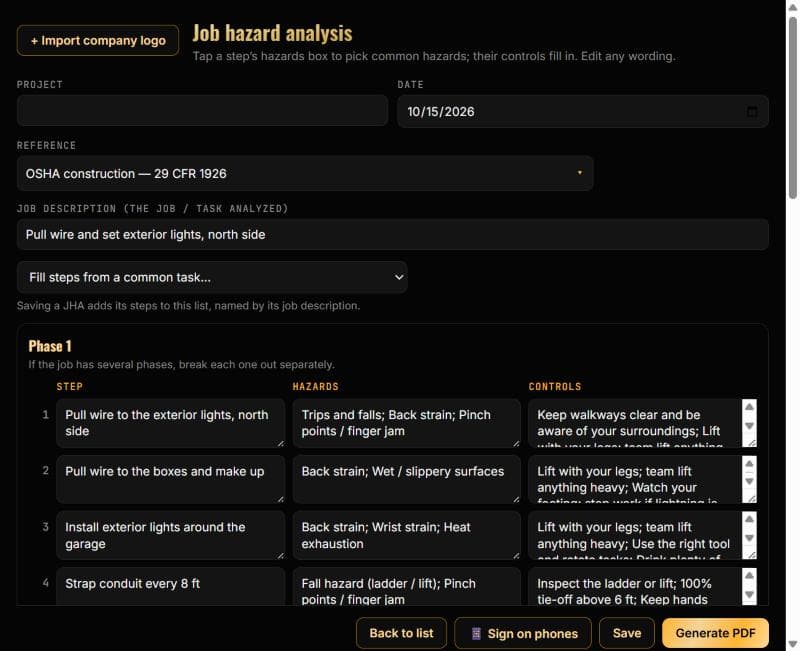
Step, hazard, control — written once, signed by the crew, filed for good.
Tap a step's hazards box to pick the common ones and their controls fill in; edit any wording. Start from a common task, or copy yesterday's JHA for today. It's the JHA tab inside ShefaLinx.
- Step / Hazards / Controls form with pick-lists of common hazards, and an OSHA 29 CFR 1926 reference
- Fill the steps from a common task, or copy an earlier JHA for today
- Crew signs on their own phones — no paper, no passing a clipboard around
- Generate a PDF with your company logo at the top
- Filed by year and month, with a history search across every job
For management
Who is running which job — on one page.
Build the field leadership chart for each job, keep it current as people move, and hand anyone a clean PDF.
Field Leadership Org Chart
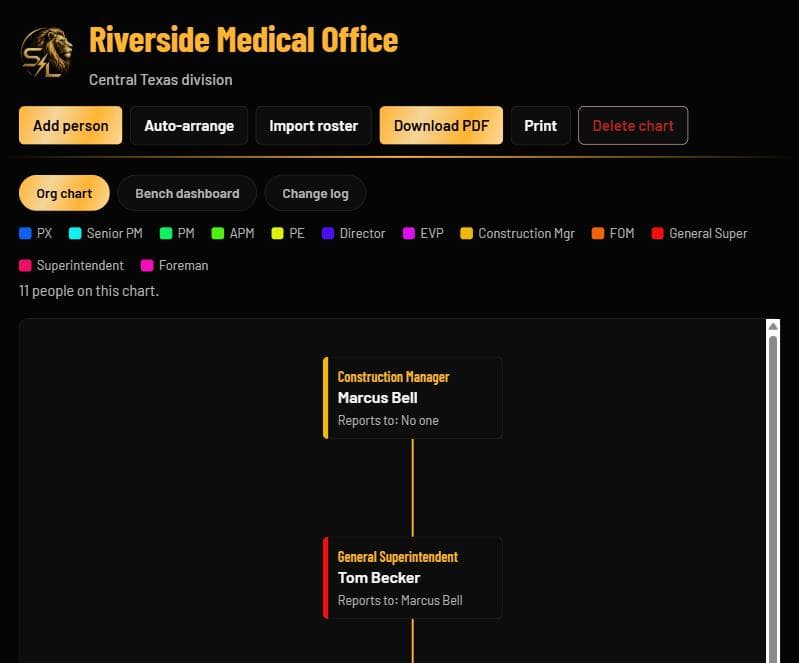
A live org chart for every job, from the construction manager down to the foreman.
Roles are color-coded, so the chart reads at a glance. Add people one at a time or import a roster, auto-arrange the layout, and keep a change log of who moved. It's the Flowchart tab inside ShefaLinx.
- One org chart per job, with every role color-coded — from PX and PM to General Superintendent, Superintendent, and Foreman
- Add people one at a time, import a roster, or auto-arrange the layout
- A bench dashboard and a change log sit alongside the chart
- Download a PDF or print it
Status key — Live on job sites · In beta · In development
Live demo
The manpower math, without installing anything.
This is the same crew-vs-schedule calculation Manloader runs, plus the voltage drop and conduit fill checks the field uses daily. Change any input and the numbers update as you type.
Within the 3% recommended in NEC 210.19(A) / 215.2(A).
VD = √3 × 12.9 × 210 A × 240 ft ÷ 250,000 cmil
Reference calculations for estimating and checking your own work — not a substitute for a stamped design. Values follow the 2023 NEC; confirm against the code cycle your jurisdiction has adopted.
Why it's built this way
Three rules ShefaLinx has to follow.
Construction software has a reputation for being slow, bloated, and clearly designed by someone who has never worn a hard hat. These are the rules that keep it from going the same way.
Milestones, not just tasks
Power-on, air-on, temp removal, or any date the schedule hinges on — tracked against real progress, not a percentage someone typed in.
Works with no signal
Job sites are basements and steel decks. Every calculation runs on the device, so nothing depends on bars.
Manpower, checked against the date
Manloader flags the week a crew falls under what the finish date requires — before that shortfall costs a milestone.
Where the proceeds go
Built for the superintendent. Sent to the mission.
ShefaLinx exists to solve a real problem in the field — nothing more complicated than that. What it earns is a separate matter: the proceeds from ShefaLinx go to community outreaches and crusades.
“And he said unto them, Go ye into all the world, and preach the gospel to every creature.”
Mark 16:15, KJV
“Go ye therefore, and teach all nations, baptizing them in the name of the Father, and of the Son, and of the Holy Ghost: teaching them to observe all things whatsoever I have commanded you: and, lo, I am with you alway, even unto the end of the world. Amen.”
Matthew 28:19–20, KJV
“For whosoever shall call upon the name of the Lord shall be saved. How then shall they call on him in whom they have not believed? and how shall they believe in him of whom they have not heard? and how shall they hear without a preacher? And how shall they preach, except they be sent? as it is written, How beautiful are the feet of them that preach the gospel of peace, and bring glad tidings of good things!”
Romans 10:13–15, KJV
Try ShefaLinx on a sample job.
The demo runs in your browser — nothing to install and no account. Add a punch item, load a crew, fill out a JHA. When you're ready to run your own job on it, tell me what you need.